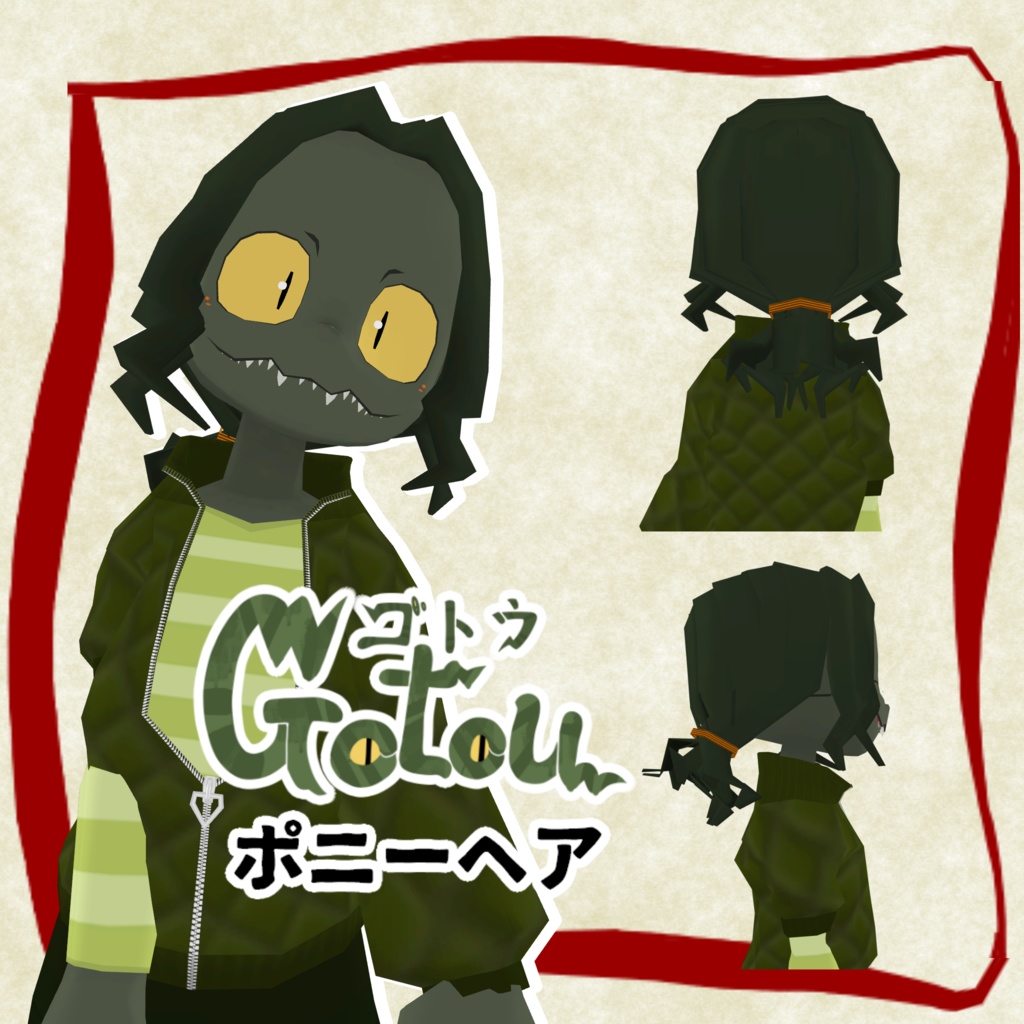
gotou-ゴトウ-向け髪型モデル ポニーヘア
- ダウンロード商品¥ 0無料ダウンロードgotou_ponyhair_v1.0.0.zip(6.95 MB)gotou_ponyhair_v1.0.0.zip
【gotou-ゴトウ-PonyHair】 ver1.0.0 *VRCSDK Avatar3.0(2022)のみ対応 *Performance -PC:Excellent(メッシュ、マテリアルを統合した場合、それ以外はGood) -Quest:Good(メッシュ、マテリアルを統合した場合、それ以外はMedium) 【モデル情報】 VRChat向け3DCGキャラクターモデル”gotou-ゴトウ-”( https://poverdon.booth.pm/items/5850796 )の髪の毛差分になります。 ご利用にはゴトウ本体が必要になります。ご了承ください。 【内容物】 ・Unitypackage ・modeldata -FBX -テクスチャ -ベーステクスチャ(png) -matcap(png) -UV(png) -AAOMASK(元の髪の毛消すやつ) -gotou_ponyhair_add.png(今回追加の髪ゴム部分だけの透過画像。各位改変テクスチャがある場合はレイヤーとして使ってください。) -Blenderファイル -gotou_ponyhair_v1.0.0.blend ・ReadMe.txt 【使用方法】 ∼アップロードする前に!∼ 以下をご用意ください。手順上必須となります。 VCCへの以下パッケージ追加 !各リンク先の指示に従い、VCCへ追加してください 1.AAO(Avatar Optimizer):https://vpm.anatawa12.com/avatar-optimizer/ja/ 2.MA(Modular Avatar):https://modular-avatar.nadena.dev/ja/docs/intro 1、VRChat Creator Companion(VCC)にてAvater用プロジェクト(2022版)を作成 2、AAO、MAをVCCのプロジェクトに追加 3、gotou_v1.0.1.unitypackageをインポート 4、2でインポートされたフォルダの以下プレハブをHierarchyにドラッグ Poveido/gotou_v1/gotou_v1.1.0/gotou_v1.1.0.prefab(*あらかじめゴトウのオブジェクトがある場合は不要) 5、Hierarchy上のゴトウのBodyにAAO Remove Mesh By Maskコンポーネントを追加、 ”0番のマテリアルスロットに適用”にチェックし、以下の画像を指定 Assets>Poveido>Pov_Item>Gotou_PonyHair_v1.0.0>tex>gotou_ponyhair_AAOMASK.png 6、Assets>Poveido>Pov_Item>Gotou_PonyHair_v1.0.0>gotou_ponyhair.prefabをHierarchy上のゴトウの直下にD&D 7、VRCSDKからアップロード !すこしでも軽くしたい人向けTips 手順6実行後、D&Dしたgotou_ponyhairについているAAO Marge Sikinned MeshのスキンメッシュレンダラーにHierarchy上のゴトウの”Body”を追加。 Hierarchy上のゴトウにgotou_ponyhai.matを適用(髪の毛と体のマテリアルを同一のものにする) (色改変等を行っているお方は適宜gotou_ponyhair_add.pngを追加したテクスチャ画像をご用意ください) ※Android build時にSDKから以下のエラーが出た場合は[Auto Fix]をクリックしてからアップロードして下さい。 [ Default texture format on Android should be set to the newer ASTC format to reduce VRAM usage (this could take a while).Texture setting can be overridden on an individual basis. ] ※アバターについてSDKから以下のWarningが出ますがアップロードに問題ないため無視してください。 [ This avatar contains one or more animator states with Write Defaults disabled where the animation clip either missing or empty. To avoid animation issues, assign animation clips containing at least property. ] 【著作者】 poverdon 【連絡先】 不明点、バグ報告等ございましたらBoothメッセージまたは以下にてお問い合わせください。 twitter: https://twitter.com/poverdon booth: https://poverdon.booth.pm/
利用規約
【利用規約】 1.基本はGotou-ゴトウ-と同じです。 最新版は以下より閲覧できます。 URL: https://drive.google.com/drive/folders/1KtxQmsig76QbZ2xFIWPzDUQ0gqiSP_sZ?usp=sharing (この利用規約はVN3ライセンスを利用して作成しました。( https://www.vn3.org/index )) 2.改変データ頒布ガイドライン(歩餅堂-poveido- 製3DCG モデル用) ( https://poverdon.booth.pm/items/6175073 ) :本データを用いた改変データ配布の際はご一読ください 【禁止事項】 本モデルを使用し、以下の行為を行うことを禁止します。 *公序良俗に反する使用 *他者への迷惑行為および誹謗中傷 *本モデルを貶める行為 【免責事項】 本モデルを使用して発生したトラブルや不利益に対し、著作者は一切責任を負いません。 【Prohibitions】 The following actions are prohibited using this model. *Use contrary to public order and morals *Disturbing or defaming others *Actions that undermine this model 【Disclaimer】 The author assumes no responsibility for any trouble or disadvantage caused by the use of this model.
更新履歴
【更新履歴】 2025/10/24 v1.0.0 配布開始